
Tubi TV
2 Hours Ago
91.3 MB
v10.1.0
Android 5.0+
1M+
Images


Description
Streaming movies and TV shows has become the preferred way to watch content for millions of people worldwide. While many services require monthly subscriptions, Tubi TV stands out as a completely free and legal alternative. This comprehensive guide explains everything you need to know about Tubi TV APK, how it works, and why it’s different from other streaming apps.
What is Tubi TV?
Tubi TV is a legitimate streaming service owned by Fox Corporation that offers thousands of movies and TV shows completely free. Unlike sketchy external apps, Tubi is a legal platform with proper licensing agreements for all its content. The service makes money through advertisements rather than subscriptions, which means you watch occasional commercials during your viewing.
The platform launched in 2014 and has grown significantly, now offering over 50,000 titles across various genres. Tubi partners with major studios, including Paramount, Lionsgate, MGM, and many others, to provide quality content legally and safely.
What makes Tubi unique is that it combines the free aspect that attracts users to questionable apps with the legitimacy, reliability, and safety of official streaming services. You get the best of both worlds without any legal concerns or security risks.
Why Tubi TV is Different
Completely Legal and Safe
The most important distinction is that Tubi operates entirely within the law. Every movie and show on the platform is licensed properly, meaning content creators get paid, and you’re not breaking any copyright laws by watching.

You don’t need to worry about legal consequences, malware infections, or privacy violations. Tubi is available directly through the Google Play Store, which means it has passed Google’s security checks and follows proper guidelines.
No Subscription Required
Tubi never asks for payment information or monthly fees. You don’t need a credit card to sign up. Simply download the app, create a free account (or skip registration entirely), and start watching immediately.
There are no premium tiers, no hidden costs, and no trials that automatically convert to paid subscriptions. Everything on Tubi remains free forever.
Quality Content Library
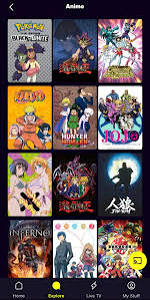
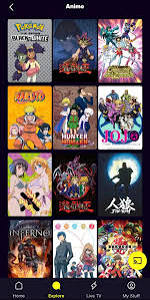
While Tubi might not have the latest blockbusters that just left theaters, its library includes many recognizable titles. You’ll find cult classics, popular TV series, documentary content, anime, and films across every genre imaginable.
The selection includes content from major studios and networks, not just unknown or low-budget productions. Many people are surprised by how many familiar titles appear when browsing Tubi.
Key Features of Tubi TV
Extensive Movie and Show Collection
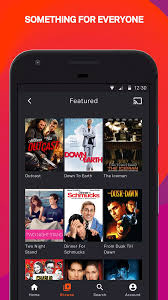
Tubi’s library exceeds 50,000 titles, making it one of the largest free streaming services available. The content spans multiple categories, including action, comedy, drama, horror, thriller, romance, science fiction, documentaries, kids’ programming, and more.
You’ll find TV shows ranging from classic sitcoms to recent series. The movie selection includes everything from Oscar winners to beloved cult favorites. International content provides access to films from around the world.
User-Friendly Interface
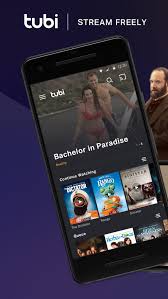
The Tubi app features a clean, intuitive design that makes browsing easy. The home screen displays featured content, trending titles, and personalized recommendations based on your viewing history.
Categories are clearly organized, and the search function helps you find specific titles quickly. You can add movies and shows to your queue for easy access later.
Multiple Device Support
While this guide focuses on the Android APK, Tubi works across numerous platforms. You can watch on smartphones, tablets, smart TVs, streaming devices like Roku and Fire TV, gaming consoles, and through web browsers on computers.
Your watchlist and viewing progress sync across devices when you create an account, allowing you to start watching on your phone and continue on your TV.
Video Quality Options
Tubi streams in up to 1080p HD when your internet connection supports it. The app automatically adjusts quality based on your bandwidth to prevent buffering, but you can also manually select your preferred quality setting.
Minimal Advertising
Yes, Tubi includes commercials, but they’re significantly fewer than traditional cable television. Most movies include four to six ad breaks, with each break lasting about two to three minutes. This is a small price to pay for completely free, legal content.
The ads are also less intrusive than pop-ups and redirects you encounter with illegal streaming apps. They play during natural breaks in the content, similar to traditional TV.
How to Download Tubi TV APK
Unlike the questionable apps discussed in previous guides, getting Tubi TV on your Android device is simple and safe.
Official Google Play Store Method (Recommended)
The easiest and safest way to get Tubi is directly from the Google Play Store:
- Open the Google Play Store app on your Android device.
- Search for “Tubi TV” or “Tubi – Movies & TV Shows”.
- Tap on the official Tubi app (verified with a checkmark).
- Press Install and wait for the download to complete.
- Open Tubi and start watching.
This method ensures you get the authentic app without any modifications or security risks. Updates install automatically, keeping the app current with the latest features and security patches.
APK Download Method (Alternative)
If you prefer downloading the APK file directly or if the Google Play Store isn’t accessible on your device, you can download from Tubi’s official website or trusted APK repositories:
- Visit Tubi’s official website on your phone’s browser.
- Look for the Android download option.
- Download the official APK file.
- Enable “Install unknown apps” for your browser in your phone’s security settings.
- Open the downloaded APK file and tap Install.
When downloading APKs, always use official sources or extremely reputable APK sites like APKMirror to avoid modified versions that might contain malware.
Creating an Account (Optional)
Tubi allows you to watch content without creating an account, but signing up offers benefits:
- Synced watchlists across devices.
- Personalized recommendations based on viewing history.
- Ability to resume watching where you left off on any device.
- Parental control options.
Creating an account is free and only requires an email address. You can also sign in using your Facebook or Google account for faster setup.
Using Tubi TV Effectively
Browsing Content
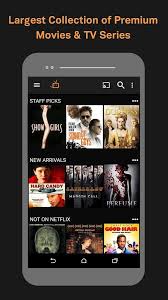
When you open Tubi, the home screen shows featured content and trending titles. Scroll down to explore different categories like “Not on Netflix,” “Cult Classics,” “Highly Rated on Rotten Tomatoes,” and more.
The “Leaving Soon” section alerts you to titles that will be removed from the platform shortly, helping you prioritize what to watch.
Search and Discovery
The search function accepts movie titles, actor names, directors, or genres. Results appear instantly as you type, making it easy to find specific content.
Tubi’s recommendation system learns from your viewing habits and suggests similar content you might enjoy. The more you watch, the better the recommendations become.
Creating Your Queue
Add interesting titles to your queue by tapping the “Add to My List” button. Your queue appears in the app’s menu for quick access to saved content.
This feature is particularly useful when browsing but not ready to watch immediately. Build a collection of movies and shows for future viewing sessions.
Subtitle Options
Many titles on Tubi include closed captions and subtitles. Access these options through the settings icon while watching content. This feature helps when watching in noisy environments or for viewers who are deaf or hard of hearing.
What to Watch on Tubi
Popular Movies
Tubi’s movie library includes recognized titles across all genres. You’ll find action films, comedies, dramas, horror movies, and more. While the newest theatrical releases won’t appear immediately, Tubi regularly adds popular films that have completed their initial release windows.
The platform is particularly strong in classic cinema, cult favorites, and genre films that have dedicated fan bases.
TV Series
From classic sitcoms to dramatic series, Tubi offers complete seasons of numerous shows. You can binge-watch entire series without paying subscription fees.
Content includes both well-known network shows and hidden gems that deserve more attention.
Documentaries
Tubi features extensive documentary content covering history, true crime, nature, science, and social issues. Many of these documentaries would normally require rental fees or specialty channel subscriptions.
Kids Content
Parents appreciate Tubi’s dedicated kids section with age-appropriate movies and shows. The content is curated to be suitable for children, though parental supervision is always recommended.
International Films
The platform includes foreign language films with English subtitles, providing access to cinema from around the world. This selection appeals to viewers interested in international storytelling.
Tubi TV vs Other Streaming Services
Tubi vs Netflix
Netflix requires a monthly subscription but offers exclusive original content, newer releases, and a more polished interface. Netflix doesn’t include advertisements.
Tubi is completely free but includes ads and doesn’t feature the newest theatrical releases or original programming. However, for many viewers, Tubi’s free model makes it an excellent complement to paid services rather than a replacement.
Tubi vs Piracy Apps
This comparison is crucial. Apps like PPCine, FilmBus, and others discussed in previous guides operate illegally and pose security risks. Tubi provides:
- Complete legality with no copyright concerns.
- No malware or security threats.
- Reliable streaming without broken links.
- Official support and regular updates.
- No risk to your device or personal information.
The trade-off is watching some advertisements, but most users find this acceptable for legal, safe, free entertainment.
Tubi vs Other Free Services
Compared to Pluto TV, Crackle, or Peacock Free, Tubi generally offers the largest content library. Each service has strengths, and many users enjoy multiple free platforms to maximize their viewing options.
Troubleshooting Common Issues
Buffering or Loading Problems
If content buffers frequently, first check your internet connection speed. Streaming video requires at least 3-5 Mbps for standard definition and 5-10 Mbps for HD quality.
Close other apps using bandwidth in the background. Move closer to your WiFi router or switch to a wired connection if possible. Lower the video quality in Tubi’s settings if buffering persists.
App Crashes
If Tubi crashes repeatedly, try these solutions:
- Clear the app’s cache through your phone’s settings.
- Update to the latest version through the Play Store.
- Restart your device.
- Uninstall and reinstall the app.
Most crashes result from temporary glitches that these steps resolve.
Content Won’t Play
Occasionally, specific titles may not play due to licensing restrictions or technical issues. Try a different movie or show to determine if the problem is widespread or limited to one title.
Ensure your app is updated to the latest version, as older versions sometimes have compatibility issues with newer content.
Login Problems
If you can’t sign in to your account, verify you’re using the correct email and password. Use the “Forgot Password” option to reset your credentials if needed.
Remember that you can use Tubi without an account if login issues persist, though you’ll lose personalization features.
Maximizing Your Tubi Experience
Explore Different Categories
Don’t just stick to one genre. Tubi’s strength lies in its diversity. Explore categories you wouldn’t normally consider – you might discover new favorites.
The “Not on Netflix” category specifically highlights content unavailable on subscription services, making Tubi a valuable complement to paid platforms.
Check “Leaving Soon”
Content licensing agreements mean titles occasionally leave the platform. The “Leaving Soon” section helps you catch movies and shows before they disappear.
Use Multiple Devices
Take advantage of Tubi’s cross-platform availability. Start watching on your phone during a commute, then continue on your TV at home. Your progress syncs automatically with an account.
Create Multiple Profiles
If sharing Tubi with family members, create separate profiles to keep recommendations personalized and maintain individual watchlists.
Accept the Ads
Remember that advertisements enable the free service. The commercial breaks are reasonable and far less intrusive than many alternatives. Use ad breaks to grab snacks, check messages, or simply take a brief rest.
Privacy and Data Considerations
As a legitimate service, Tubi has a clear privacy policy explaining how user data is collected and used. The company collects viewing data to personalize recommendations and deliver targeted advertising.
This data collection is standard for streaming services and far more transparent than questionable third-party apps that might misuse personal information. You can review Tubi’s full privacy policy on their website to understand exactly what information is collected and how it’s used.
Tubi doesn’t sell your personal information to third parties, and the platform maintains security measures to protect user data.
The Business Model Explained
Understanding how Tubi makes money helps explain why it’s both free and legal. The service operates on an advertising-supported video on demand (AVOD) model.
Advertisers pay Tubi to show commercials to viewers. This revenue funds content licensing agreements with studios and keeps the service free for users. It’s similar to traditional broadcast television but delivered through internet streaming.
This business model has proven successful, leading to Tubi’s acquisition by Fox Corporation for $440 million in 2020. The investment demonstrates confidence in free, ad-supported streaming as a sustainable approach.
Future of Tubi TV
Tubi continues expanding its content library and adding features. The platform has been investing in exclusive content deals and even some original programming.
As more viewers cut cable subscriptions and seek free alternatives, Tubi’s position strengthens. The service represents a legitimate option in the streaming landscape, proving that legal, free entertainment is viable and sustainable.
Expect Tubi to grow its offerings, improve its recommendation algorithms, and potentially expand into more original content while maintaining its free model.
Conclusion
Tubi TV APK offers Android users a fantastic opportunity to enjoy thousands of movies and TV shows completely free and legally. Unlike questionable streaming apps that pose legal and security risks, Tubi operates transparently with proper licensing, reliable performance, and official support.
The service includes occasional advertisements, but this minor inconvenience is more than offset by the benefits of legal, safe, extensive entertainment options at no cost. You don’t need to risk malware infections, copyright violations, or device security to watch great content on your phone.
For anyone who previously considered using illegal streaming apps, Tubi presents a clear alternative that eliminates all those concerns. The content library rivals or exceeds many questionable apps, and the viewing experience is far more reliable.